Rather than relying solely on packaged solutions, I built a dedicated llama.cpp runtime platform running inside a Proxmox LXC container with GPU passthrough and CUDA acceleration.
Engineering Case Study - AI Infrastructure
Building a llama.cpp Runtime Platform
After building a local AI platform using Open WebUI and Ollama, I wanted to understand what was happening underneath the runtime layer. This project explored GPU-accelerated inference using llama.cpp, Qwen 14B GGUF, Open WebUI integration, and recovery-focused platform engineering practices.
Validated Stack
Operational
- VirtualizationProxmox
- Container OSDebian 13
- GPURTX 3090
- RuntimeCUDA Toolkit
- Inferencellama.cpp
- InterfaceOpen WebUI
- Model FormatGGUF
- Validated ModelQwen 14B
Executive Summary
Understand the runtime, model formats, API layer, and recovery strategy behind local AI infrastructure.
The platform successfully served a Qwen 14B GGUF model through llama-server, integrated with Open WebUI, and leveraged an RTX 3090 for inference acceleration.
Primary Lesson
"Understanding the layers beneath a platform is what allows you to troubleshoot, recover, and scale it."
Learning Objectives
The project focused on operating local AI runtimes, not just using models.
What llama.cpp actually does
Understand the runtime behavior beneath packaged local AI tools.
How GGUF models work
Learn how model files, quantization, and runtime compatibility affect deployment choices.
Inference versus training
Separate model serving concerns from the very different requirements of model training.
GPU runtime flow
Validate how AI runtimes interact with drivers, CUDA libraries, and physical GPU resources.
Open WebUI integration
Trace how the application layer communicates with model backends through an API surface.
Enterprise operation
Run local AI infrastructure with repeatability, recovery, documentation, and ownership.
Why It Matters
Most AI demonstrations focus on using models. I wanted to understand how to operate them.
Architecture Overview
The platform separates host infrastructure, container execution, GPU acceleration, model serving, and user access into clear layers.
Supplemental Architecture Context
Ready for the supplied llama.cpp Runtime Platform Architecture image
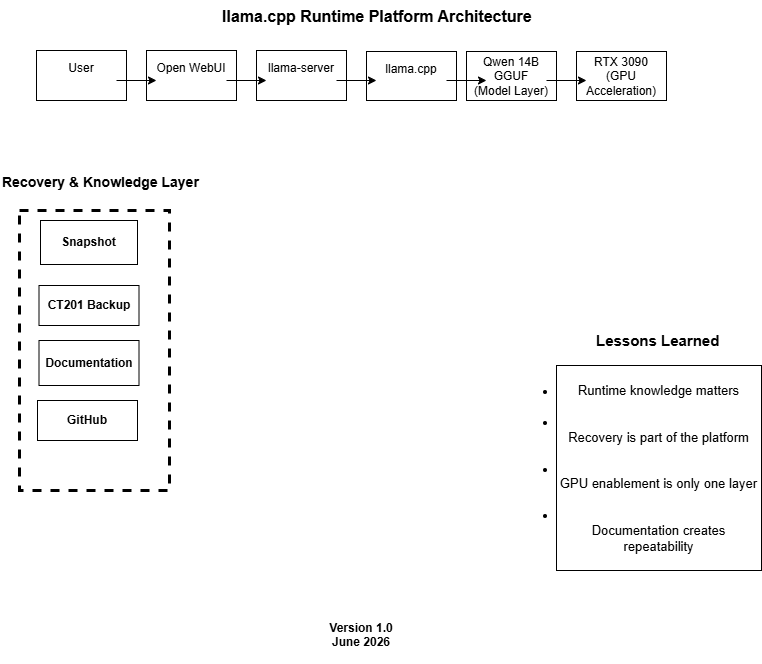
Validated Logical Flow
- Proxmox
- Debian 13 LXC
- RTX 3090
- CUDA Toolkit
- llama.cpp
- llama-server
- Qwen 14B GGUF
- Open WebUI
Runtime Request Path
Open WebUI request, llama-server API response, GPU-accelerated model inference
Build Process Timeline
The build progressed from platform planning through runtime validation, application integration, recovery planning, and lessons learned.
- 01Platform Planning
- 02Container Deployment
- 03GPU Enablement
- 04Runtime Installation
- 05Model Validation
- 06Application Integration
- 07Recovery Planning
- 08Lessons Learned
Lessons Learned
The most valuable work was understanding why the platform ran, not only proving that it could run.
Runtime knowledge matters
Understanding the backend runtime makes troubleshooting more direct and future scaling decisions clearer.
Recovery is part of the platform
A working state is most useful when it can be protected, restored, and repeated.
GPU enablement is only one layer
Drivers and CUDA matter, but they still need to connect cleanly to containers, runtimes, APIs, and applications.
Documentation creates repeatability
Notes, validation steps, and known-good baselines reduce future troubleshooting time.
Signature Notes
Matt's Notes
I originally thought this project would mostly be about running a model.
It wasn't.
Most of my time was spent understanding how GPU passthrough, NVIDIA drivers, CUDA libraries, llama.cpp, llama-server, Open WebUI, and GGUF models fit together.
Looking back, that turned out to be the most valuable part of the project.
The model running was the result. Understanding why it ran was the lesson.
One thing that surprised me was how similar AI infrastructure feels to traditional infrastructure. The technologies are different, but the fundamentals are familiar:
- Build from a known baseline
- Validate assumptions
- Create recovery points
- Document everything
- Protect what works
If I were starting again today, I would spend less time trying to rescue questionable environments and more time rebuilding from known-good configurations.
That lesson alone probably saved me dozens of future troubleshooting hours.
Business Value
Organizations evaluating AI infrastructure need more than model access.
Repeatability
Known-good patterns make AI runtime environments easier to rebuild and extend.
Recoverability
Recovery planning protects validated platform states before future changes introduce risk.
Operational Visibility
Runtime-layer understanding improves diagnosis across GPU, CUDA, model serving, and application access.
Documentation
Clear notes convert one successful build into a repeatable infrastructure practice.
Platform Ownership
Owning the runtime layer gives teams more control over performance, privacy, and cost.
Enterprise Discipline
The project applies familiar infrastructure principles to a newer AI platform surface.
Runtime Category
AI Infrastructure, Platform Engineering, Local AI Runtime Platforms, and GPU Computing.
- AI Infrastructure
- Platform Engineering
- Local AI Runtime Platforms
- GPU Computing